Guide
How to Apply an Iron-On Vinyl (HTV) Decal With a Home Iron
Step-by-step: press a heat transfer vinyl decal onto a shirt with a household iron, which fabrics work, and how to wash it so it lasts.
Heat transfer vinyl (HTV) is thin vinyl with a heat-activated adhesive on the back. It comes on a clear, slightly sticky carrier sheet that holds every letter in place. Heat and pressure bond the vinyl to the fabric, then you peel the carrier away. Our iron-on decals are cut from Siser EasyWeed HTV, and our iron-on listings note that a small tester decal and a "How To" reminder come with your decal, so you can practice first.
Before you start
- Check the fabric. As our listings explain, iron-on decals work on cotton, polyester and blends. Standard iron-on doesn't apply to nylon and some synthetics, and heat-sensitive fabrics like satin and silk may need lower heat so they don't scorch. Not sure about a fabric? Message the shop on Etsy before you order.
- Use a hard, flat surface. Siser's instructions don't recommend an ironing board because it's too soft for even pressure. A sturdy table or counter protected by a heat-safe pressing mat works well.
- Turn off the steam and empty the water tank if you can.
- Practice with the tester on a scrap of fabric or an inside hem.
Step by step
- Heat the iron. Siser's home-iron instructions for EasyWeed: set the dial between Cotton and Linen, no steam.
- Pre-press the garment for a few seconds to flatten wrinkles and drive out moisture.
- Position the decal with the clear carrier facing up and the vinyl against the fabric. To center a design, fold the shirt in half and press lightly to make a center crease.
- Cover it with a heat transfer cover sheet, multipurpose paper or parchment paper.
- Press, don't iron. Press straight down with medium-to-firm pressure for 10 to 15 seconds on each section, then lift the iron and move to the next section. Sliding the iron can shift letters. Give edges and thin lines their own press.
- Peel the carrier. EasyWeed can be peeled hot or cold. Peel slowly and low. If any part lifts with the carrier, lay the carrier back down, cover it and press that area again for 5 to 10 seconds.
Using a heat press instead? Siser lists 305°F (150°C) with medium pressure for 10 to 15 seconds for EasyWeed. Always check Siser's current instructions for your equipment.
Washing so it lasts
- Wait 24 hours before the first wash.
- Turn the garment inside out and machine wash with a mild detergent.
- Skip bleach and liquid fabric softener, and don't dry clean.
- Dry on a normal setting, and don't iron directly on the vinyl later.
Troubleshooting
- Edges lifting: usually not enough heat, pressure or time. Cover the design and press again.
- Letters shifted: the iron probably slid. Press straight down and lift between sections.
- Fabric looks scorched or shiny: too hot for that fabric. Lower the heat and use a cover sheet.
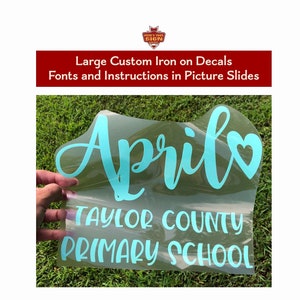 Custom & Personalized Iron On Vinyl Transfer Decal. Graphics and Text. Shirt Decal. Family Iron On Decal. Large Personalized Name or Word.From $8.10
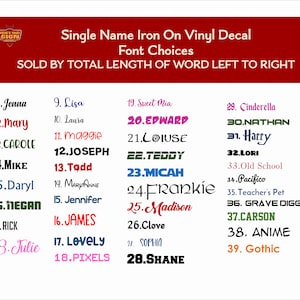 Personalized Custom Name Iron On Vinyl Decal Transfer Sold By Total Length- left to right- DIY Christmas Stocking, wedding, Iron on nameFrom $2.85
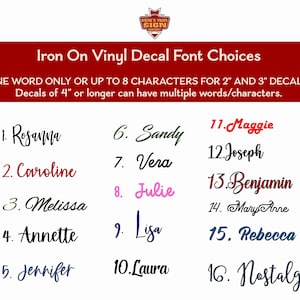 Personalized Custom Name Iron On Vinyl Decal Transfer Sold By TOTAL Word Length (left to right) Cursive Fancy Fonts DIY, iron on nameFrom $2.85
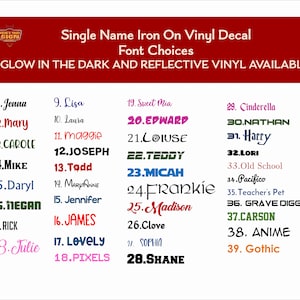 Personalized Custom Name Iron On Vinyl Decal Transfer Sold By Total Length- left to right- DIY Christmas Stocking, wedding, Iron on Name.From $2.85